Skip to content
Blend
PlatformBlenny
DiscoverTalk to our teamSign in
Blend
PlatformBlenny
DiscoverTalk to our teamSign in
TermsPrivacy

For conferences

Conference registration and ticketing, from sign-up to room check-in

Registration that asks the questions you need, passes for one day or all of them, invitations your sponsors and speakers issue themselves, and check in at the front desk and at every room.

Create your eventTalk to our team
  • Registration built around your attendees
  • Ticket types, day passes and full passes
  • Group registration for teams
  • Speakers, sponsors and exhibitors
  • The programme on the event page
  • Check in at the desk and at every room
  • A conference already run on Blend
  • How to open registration for a conference
  • Pricing and next steps

Registration built around your attendees

A conference needs more from a buyer than a name and an email. On Blend you add your own registration questions to the checkout: company, job title, dietary needs, which workshop they want. Questions can be text, a choice from a list, a date, a number and more, each one required or optional, and a follow up question can appear only when an earlier answer calls for it.

Each attendee's answers sit on their record in the guest list, next to their ticket. The list itself can be searched, filtered by ticket type and exported when the venue asks for names.

See how to manage an event guest list.

Ticket types, day passes and full passes

Model the conference the way you sell it.

  • As many ticket types as you need, such as delegate, student and VIP, each with its own price and quantity.
  • Single day tickets and multi day passes on the same event. A pass is checked in once per day, and the guest list shows who came on which day.
  • Early release pricing with sale dates that open and close on their own.
  • Free tickets and RSVPs cost nothing, so a free community day can sit next to a paid summit.
  • Promo codes for partners and member organisations.

Group registration for teams

Companies send teams. With group registration on, one person books several tickets in one order and enters the details of each attendee. Every attendee gets their own QR ticket, so colleagues arrive separately and check in on their own phone.

Speakers, sponsors and exhibitors

A large share of a conference crowd never buys a ticket: speakers, sponsor guests, exhibitor staff. The partner invitation portal gives each sponsor, exhibitor or speaker their own allocation, and they issue their own invitations from it under their name. You see exactly who each partner invited, and those guests scan in like everyone else.

Sponsors can also appear where every attendee looks: their logos on the ticket, its PDF and the confirmation email.

The programme on the event page

Publish the line up and the programme on the event page, with a questions and answers section for the things attendees always ask. The page is the same one buyers check out from, on blendapp.ai or on your own white-label ticketing website.

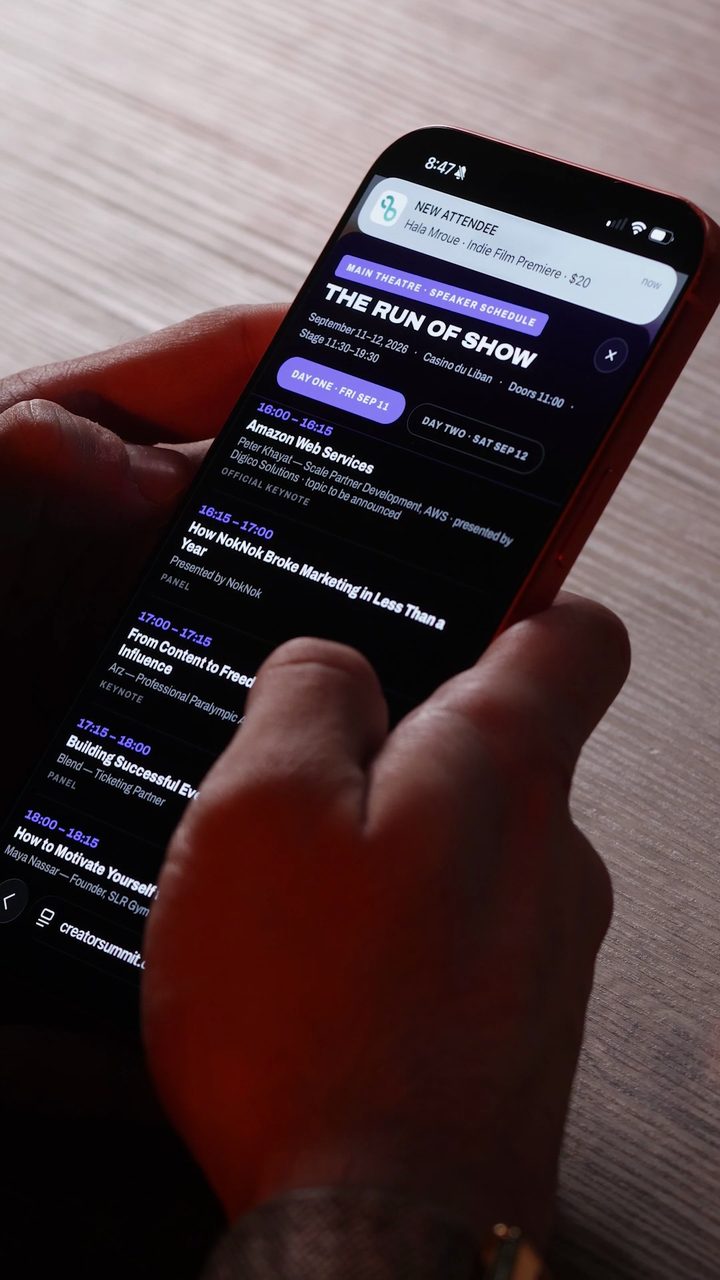
Creator Summit's run of show on a phone: the main theatre speaker schedule for day one at Casino du Liban
The speaker schedule, on the attendee's phone.

Check in at the desk and at every room

At the front desk, staff scan each attendee's QR with a phone, or find them by name. Inside, zone readers do the second scan at the doors that matter: the main hall, a workshop room, the speakers lounge. Each reader admits only the ticket types you tick for that room, never uses up the attendee's entry, and counts people in, so you know how full a session was. More on access control and check in.

For seated sessions or sponsor tables, set up reserved seating with a seat map, so each attendee's ticket carries their seat.

A conference already run on Blend

Creator Summit 2026 sold 916 tickets on Blend, with registration, check in and sponsor reporting coming out of one place. Browse conferences on Blend to see what an event page looks like.

Running a conference in Dubai? Read how to get a Dubai event permit.

How to open registration for a conference

  1. 1

    Create the event

    Add the dates, venue and programme. Create an event to start.
  2. 2

    Add tickets and passes

    Set up your ticket types, day tickets and multi day passes.
  3. 3

    Write your questions

    Add the registration questions you need and turn on group registration.
  4. 4

    Invite your partners

    Give sponsors, exhibitors and speakers their allocations.
  5. 5

    Check everyone in

    Scan at the desk, place zone readers at the rooms, and watch attendance in the console.

Pricing and next steps

On paid tickets the buyer pays a processing fee at checkout, and payouts land in your account within days of the event. Some of the tools on this page are part of Blend's paid plans. See how pricing works, read about ticketing in Lebanon, explore everything Blend does for organizers, or contact us about your conference.

On this page

  • Registration built around your attendees
  • Ticket types, day passes and full passes
  • Group registration for teams
  • Speakers, sponsors and exhibitors
  • The programme on the event page
  • Check in at the desk and at every room
  • A conference already run on Blend
  • How to open registration for a conference
  • Pricing and next steps

Questions

Conference registration questions

Use one system for the registration form, the tickets and the check in. On Blend you add your own registration questions, sell day tickets and multi day passes, and scan attendees in at the desk and at each room from the same guest list.

Yes. Add your own questions to the checkout, as text, a choice from a list, a date, a number and more. Each can be required or optional, and a follow up can appear only for certain answers.

Yes. With group registration on, one buyer books several tickets in one order and enters each attendee's details. Every attendee receives their own QR ticket.

A multi day pass is checked in once per day, and the guest list shows who came on which day.

Use the partner invitation portal. Each sponsor, exhibitor or speaker gets an allocation and issues their own invitations from it, and you see who each one invited.

Place a zone reader at the room. It scans attendees at that door, admits only the ticket types you allow, and counts who came through without using up their entry to the conference.

Put your next event on Blend.

Free to start, no card required. Most organizers are selling the same afternoon.
Create your eventTalk to our team
Talk to our team
Blend

The operating system for events: ticketing, the door and payouts, in one place.

Create your eventTalk to our team

Organizers

  • Platform
  • Pricing
  • Ticketing in Lebanon
  • Dubai event permit
  • Best ticketing platforms
  • Blenny
  • Console

Solutions

  • Cashless payments
  • Access control and check in
  • Promoter dashboard
  • Festivals
  • Concerts
  • Conferences

Company

  • About
  • Careers
  • Press releases
  • Case studies
  • Blog
  • Organizer Problems
  • Talk to our team

Support

  • Help Center with FAQ
  • Contact Us

© 2026 Blend Technologies LTD

  • Terms
  • Privacy
  • Accessibility
  • Status

More for organizers

Selling in your market

  • Ticketing in Lebanon

    USD pricing, card and Whish checkout, door scanning and payouts.
  • Ticketing in the UAE

    AED pricing, card checkout, Apple Pay and Google Pay, QR entry.
  • Dubai event permit

    The event e-permit, the e-ticketing permit and the steps on the DET portal.
  • Pricing and fees

    Free events free, and the organizer chooses who pays the fee.
  • Compare platforms

    Blend next to Platinumlist, Ticketmaster, Viagogo, ihjoz and Tick'it.
  • Accept Whish payments

    Buyers approve in their Whish app; tickets issue on confirmation.
  • Cashless payments

    NFC wristbands or the ticket QR, vendor tills and live sales.
  • Access control and check in

    Door scanners, zone readers, rotating barcodes and live counts.
  • Promoter dashboard

    A code and a tracked link per promoter, with sales and commission.
  • Festivals

    Passes, gates, wristbands and cashless vendors on one system.
  • Concerts

    Seat maps, ticket waves, promoter codes and door scanning.
  • Ticketing for Saudi Arabia

    USD or AED pricing, card checkout, door scanning. No SAR or mada yet.
  • Blenny, the AI copilot

    Blend's AI copilot: sets up and runs your event with you, from your phone.
  • Event operations

    Access control, box office, cashless and badges from one dashboard.
  • How to sell event tickets

    Online, at the door, in shops and through promoters, step by step.
  • Start an event business

    13 steps from the idea to your first event, then growing it.
  • Ticketing in Canada and the USA

    Your own ticket site, checkout in CAD or USD, each sale paid instantly to your Stripe.
  • Best event websites

    Six event websites organizers built on Blend with Blenny.
  • White label ticketing

    Your own box office under your brand and domain, built in Blend's store editor.
  • Modules

    Start with tickets and check-in, then add only what your event needs.
  • BlendOS

    One code turns a phone, tablet or POS machine into a gate or a till.
  • BlendOS for Android

    Gates, bar tills, VIP tables and vendor booths on Android devices.
  • Event bar POS

    VIP tables, bottle service and walk-in drinks, with live totals per bar.
  • Event check-in app

    QR scanning on any phone, zones and add-ons, and a live count.
  • Conference badge printing

    Badges printed on demand for speakers, press, sponsors and crew.
  • BlendOS for iPhone

    The gate, the till and Apple Wallet on the team's own iPhones.
  • BlendOS for iPad and tablets

    The box office, the bar and the badge desk on tablets.
  • Event vendor POS

    Food trucks, merch and partner bars, each with its own booth.
  • Blend vs Eventbrite

    Fast payouts, your own site, the whole night.
  • Blend vs Platinumlist

    Self-onboarding, your own site, the whole night.
  • Blend vs Ticketmaster

    Self-onboarding against the contract model, your own site.
  • Blend vs Viagogo

    The original ticket from the organizer, against fan-to-fan resale.
  • Blend vs ihjoz

    Paid fast, your own site, the whole night.
  • Blend vs Tick'it

    Paid faster, your own site, the whole night.
  • Blend vs DICE

    Tickets by email, WhatsApp and Wallet, with no app to install.
  • Blend vs Luma

    Free community events that grow into paid events, on your own site.
  • Blend vs Lepointdevente

    The Quebec ticketing comparison.
  • Blend vs Showpass

    The Canadian ticketing comparison.
  • Best ticketing platforms in 2026

    Blend, Eventbrite, Ticketmaster, DICE, Luma and more, ranked.
  • Best ticketing platforms in Lebanon

    The ticketing platforms that sell in Lebanon, ranked.
  • Best ticketing platforms in the UAE

    The ticketing platforms that sell in the UAE, ranked.
  • Best ticketing platforms in Dubai

    The ticketing platforms that sell in Dubai, ranked.
  • Best ticketing platforms in the Middle East

    The ticketing platforms that sell in Lebanon and the UAE, ranked.
  • Ticketing in Lebanon

    USD pricing, card and Whish checkout, door scanning and payouts.
  • Ticketing in the UAE

    AED pricing, card checkout, Apple Pay and Google Pay, QR entry.
  • Dubai event permit

    The event e-permit, the e-ticketing permit and the steps on the DET portal.
  • Pricing and fees

    Free events free, and the organizer chooses who pays the fee.
  • Compare platforms

    Blend next to Platinumlist, Ticketmaster, Viagogo, ihjoz and Tick'it.
  • Accept Whish payments

    Buyers approve in their Whish app; tickets issue on confirmation.
  • Cashless payments

    NFC wristbands or the ticket QR, vendor tills and live sales.

Guides for organizers: How to Sell Out an Event in Lebanon: Step-by-Step Plan, How to Price Event Tickets: Early Bird and Waves, How to Track Promoter and Affiliate Ticket Sales, Free Event Registration: Switch from Google Forms, all organizer guides.

  • Access control and check in

    Door scanners, zone readers, rotating barcodes and live counts.
  • Promoter dashboard

    A code and a tracked link per promoter, with sales and commission.
  • Festivals

    Passes, gates, wristbands and cashless vendors on one system.
  • Concerts

    Seat maps, ticket waves, promoter codes and door scanning.
  • Ticketing for Saudi Arabia

    USD or AED pricing, card checkout, door scanning. No SAR or mada yet.
  • Blenny, the AI copilot

    Blend's AI copilot: sets up and runs your event with you, from your phone.
  • Event operations

    Access control, box office, cashless and badges from one dashboard.
  • How to sell event tickets

    Online, at the door, in shops and through promoters, step by step.
  • Start an event business

    13 steps from the idea to your first event, then growing it.
  • Ticketing in Canada and the USA

    Your own ticket site, checkout in CAD or USD, each sale paid instantly to your Stripe.
  • Best event websites

    Six event websites organizers built on Blend with Blenny.
  • White label ticketing

    Your own box office under your brand and domain, built in Blend's store editor.
  • Modules

    Start with tickets and check-in, then add only what your event needs.
  • BlendOS

    One code turns a phone, tablet or POS machine into a gate or a till.
  • BlendOS for Android

    Gates, bar tills, VIP tables and vendor booths on Android devices.
  • Event bar POS

    VIP tables, bottle service and walk-in drinks, with live totals per bar.
  • Event check-in app

    QR scanning on any phone, zones and add-ons, and a live count.
  • Conference badge printing

    Badges printed on demand for speakers, press, sponsors and crew.
  • BlendOS for iPhone

    The gate, the till and Apple Wallet on the team's own iPhones.
  • BlendOS for iPad and tablets

    The box office, the bar and the badge desk on tablets.
  • Event vendor POS

    Food trucks, merch and partner bars, each with its own booth.
  • Blend vs Eventbrite

    Fast payouts, your own site, the whole night.
  • Blend vs Platinumlist

    Self-onboarding, your own site, the whole night.
  • Blend vs Ticketmaster

    Self-onboarding against the contract model, your own site.
  • Blend vs Viagogo

    The original ticket from the organizer, against fan-to-fan resale.
  • Blend vs ihjoz

    Paid fast, your own site, the whole night.
  • Blend vs Tick'it

    Paid faster, your own site, the whole night.
  • Blend vs DICE

    Tickets by email, WhatsApp and Wallet, with no app to install.
  • Blend vs Luma

    Free community events that grow into paid events, on your own site.
  • Blend vs Lepointdevente

    The Quebec ticketing comparison.
  • Blend vs Showpass

    The Canadian ticketing comparison.
  • Best ticketing platforms in 2026

    Blend, Eventbrite, Ticketmaster, DICE, Luma and more, ranked.
  • Best ticketing platforms in Lebanon

    The ticketing platforms that sell in Lebanon, ranked.
  • Best ticketing platforms in the UAE

    The ticketing platforms that sell in the UAE, ranked.
  • Best ticketing platforms in Dubai

    The ticketing platforms that sell in Dubai, ranked.
  • Best ticketing platforms in the Middle East

    The ticketing platforms that sell in Lebanon and the UAE, ranked.